
Click any task to open it. Everything about that task lives in one panel.
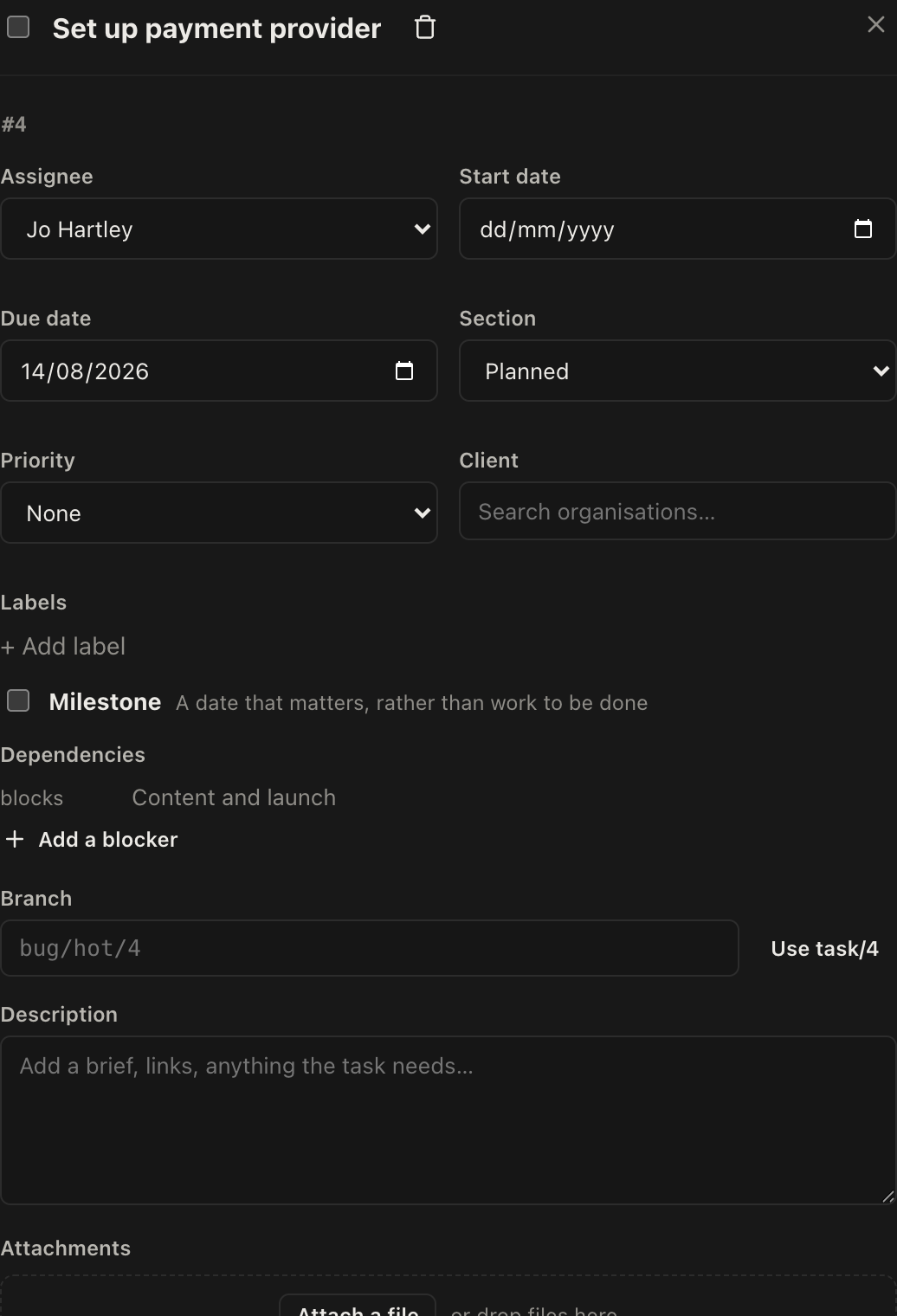
The fields
| Field | Notes |
|---|---|
| Assignee | One person. Leave it unassigned rather than guessing: unassigned is visible, a wrong name is not |
| Start date | When work should begin. Used by the calendar and dashboard |
| Due date | When it is needed. Overdue tasks are flagged everywhere they appear |
| Section | Which group it sits in |
| Priority | Optional. Only worth using if you actually sort by it |
| Client | The organisation this task is for, on projects that serve several |
| Labels | Free tagging, and a column in the list view |
| Branch | The version control branch for this task, for teams that work that way |
| Description | The brief. What "done" means |
| Milestone | Marks the task as a marker rather than a job. Shown with a diamond |
Subtasks
Break a task down with subtasks. The parent shows a done count, so "3/7" tells you where it is without opening it.
Subtasks inherit the parent's assignee when created, which saves a step in the common case where one person owns the whole thing. Each subtask can be opened in its own right, with its own dates, comments and files.
Use them for steps within one piece of work. If a subtask needs its own assignee, its own deadline and its own conversation, it probably wants to be a task in its own right.
Comments
Comments are the conversation about this specific task, kept next to the work instead of in somebody's inbox.
Mention a colleague with an @ and they get a notification. That is the right way to hand something over, because the context travels with it.
What the badges on a card mean
Cards are deliberately dense, so it is worth knowing what you are looking at.
- A diamond before the title means it is a milestone.
- A date is the due date, and it is highlighted when overdue.
- A tick with a fraction is subtask progress.
- A speech bubble with a number is the comment count.
- A paperclip with a number is attachments.
- A small circle at the end is the assignee.
Marking things done
Tick the box on the card or in the list. A completed task stays where it is, struck through, so the shape of the project is preserved and you can see what was actually done.