
From the Projects & Tasks screen, click New project.
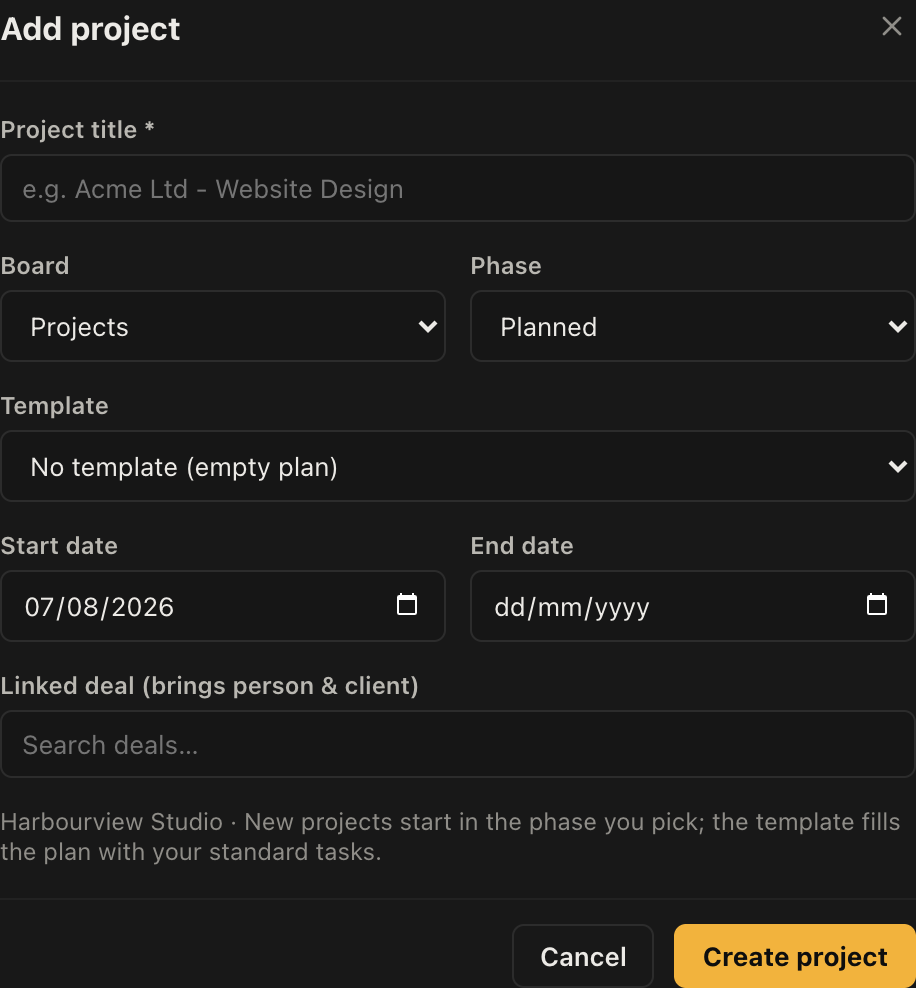
The form
- Title. Customer plus what the work is, the same rule as deal titles. "Acme Ltd - Website Design" reads correctly in a list of forty.
- Board. Which set of delivery stages this follows.
- Phase. Which stage it starts in. Usually the first.
- Template. The task plan to start from, or No template for an empty one.
- Start and end dates. Optional, and used by the calendar and dashboard views.
- Linked deal. Search for the deal this came from.
Link the deal
Worth doing every time. Linking pulls the contact and the organisation straight onto the project, so you are not retyping the customer, and it keeps the thread from enquiry to delivery in one place.
It also means the deal record shows what happened after it was won, which is the question people ask when the customer rings up nine months later.
Templates
A template is a standard task plan. If every website build has the same fourteen tasks, put them in a template once and every new project starts with them already in place.
Templates belong to a board, because their tasks map onto that board's phases. You will only be offered the templates that fit the board you picked.
Manage them with the Templates button on the Projects screen. The fastest way to build one is to run a job the usual way, then rebuild that task list as a template while it is fresh.